
FarsiNote is a completely UNICODE Compatible text editor that works with any UNICODE compatible input method such as Farsi neaType. You can create, open, edit and save text files that have a mixture of Farsi/English characters.

With FarsiNote you can open and work with several text document at the same time. You can switch between the open text files by taping on each one of the tabs at the bottom of window related to each open file.
You can search for a text in the current document. Tap on the search button on the toolbar or select Edit->Find from the menu. To continue searching in the current file, tap on the "Find Next" button on the toolbar or select Edit->Find Next from the menu.


FarsiNote has 4 different alignment options: Left, Center, Right, and a Context Related alignment. With Context Related Alignment, you can align all English text to left and all Farsi text to right. Tap on the corresponding buttons on the toolbar to change the text alignment.
To change the FarsiNote Options, tap on the Options button on the toolbar or from the menu bar select Tools->Options. Using the Options dialog box you can change the Font Size, Style, and other FarsiNote options.


To open a new text file, tap on the open button on the toolbar or select File->Open from the menu bar. To save the current file, tap on the save button on the toolbar or select File->Save from the menu bar.


Follow the these steps to download and install FarsiNote on your Pocket PC.
| FarsiNote for Windows Mobile 5.0 and 6.0 (FarsiNote5.exe) |
|
Email me for Window Mobile 2003 version FarsiPack@ShahabOnline.com |
Click on the appropriate link in the table at right begin downloading.
Your browser will ask you if you want to open the file or save it.
Click the Save button to save the FarsiNote setup program to your hard disk.
Browse to a location that you want to save the installation program and click Ok.
The downloading starts. Click Close after download is complete.
After download is completed, exit all running programs.
Ensure your mobile device is connected to your computer and the synchronization process has finished before beginning the installation process.
Double-click on the executable file that you downloaded in steps 1 to 5.
Follow the instructions provided by the setup wizard to complete the installation of FarsiNote.
Reset your mobile device to complete the installation.
| FarsiNote for Windows Mobile 5.0 and 6.0 (FarsiNote5.cab) |
|
Email me for Window Mobile 2003 version FarsiPack@ShahabOnline.com |
To install FarsiNote using these files, you need to transfer them to your device. To transfer the cabinet files to your device, you can:
After transferring the cab file to your device, tap on the cabinet file in the File Explorer to start the installation. Soft-Reset your device to complete installation.
To uninstall the FarsiNote:
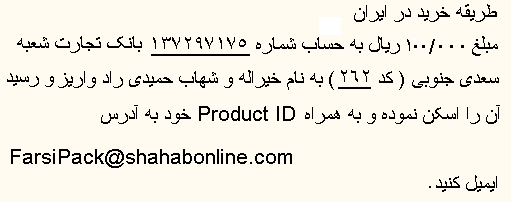
FarsiNote comes with 14 days of trial period. To use it after the expiration of this trial period, you must buy and register your copy of FarsiNote. Here is how to buy FarsiNote:
لطفا قبل از پرداخت پول از کارکرد نرم افزار روی دستگاه خود اطمینان حاصل کنید. متاسفانه من قادر به بازپرداخت پول شما بعد از خرید نرم افزار نمیباشم
PLEASE TEST THE SOFTWARE ON YOUR DEVICE BEFORE BUYING IT. UNFORTUNATELY I CANNOT RETURN YOUR PAYMENT AFTER YOU HAVE BOUGHT THE SOFTWARE.
To get your Unlock code after buying FarsiNote, you need to provide your Product ID, which is a 16-character alphanumeric string. It is available from the About dialog box. (About button on the Toolbar)
Send your Product ID to FarsiPack@ShahabOnline.com, to get the unlock code for your copy of FarsiNote. The Unlock Code is a 20-character alphanumeric string.
After getting the Unlock Code you must enter it in the About dialog box.
| Copyright © 2008 Shahab Hamidi-Rad. All rights reserved. | Last update: 01/08/2008 |